Never Forget
Where You Left Off

Pick up where you left off and keep finished videos organized. Save progress across sites, mark completion or watch again from the beginning. No account needed locally; encrypted sync is optional.

For Chrome / Edge Β· Free & Open Source Β· Automatic recording is off by default

0.0.14 Β· 2026-10-20: continuous progress tracking, completion status and a first-use tour. Download the package, release notes and checksums.
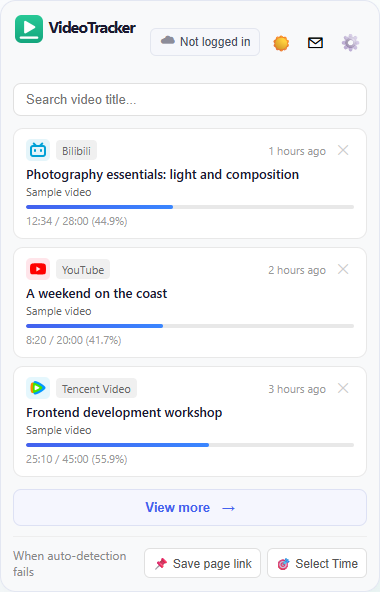
Current VideoTracker popup with unfinished videos, title search and resume
Current source interface Β· Fictional sample records

Core Features

Simple, efficient, privacy-first video progress management

🎯

Auto Record

Enable to add new records after actual playback reaches your threshold. Off by default. Existing records keep updating, with saves on pause, end and video switches.

⌨️

Shortcut Save

Save with Ctrl+Shift+V, or Command+Shift+V on Mac. Manual saving works even when automatic recording is off.

πŸš€

One-Click Resume

Open a record to return to its video and restore your position in supported players. Compatibility depends on the website.

⏱️

Smart Threshold

Only actual playback counts: pauses, buffering and seeking do not. Default 30 seconds; choose 0 / 10 / 30 / 60 / 120 seconds.

πŸ”

Search & Filter

The popup focuses on unfinished videos. Filter records by title, episode and date, recognize site icons, and delete individual or selected records.

☁️

Encrypted Sync

Sign in, set a sync encryption password, and upload encrypted watch records and site rules for safe cross-device restore.

🌐

Site Exclusions

Exclude a domain or webpage URL and its subdomains from new automatic records. Existing records keep updating and manual saving still works. Remove the rule to restore automatic additions.

πŸ’¬

Report a Problem

Send up to 500 characters, one optional PNG/JPG/WebP image up to 5 MB and an optional email. Confirm the purpose before your first submission.

🎨

Language & Theme

Choose Chinese or English, with a light, dark or system theme for your records and settings.

βœ“

Watching & Completed

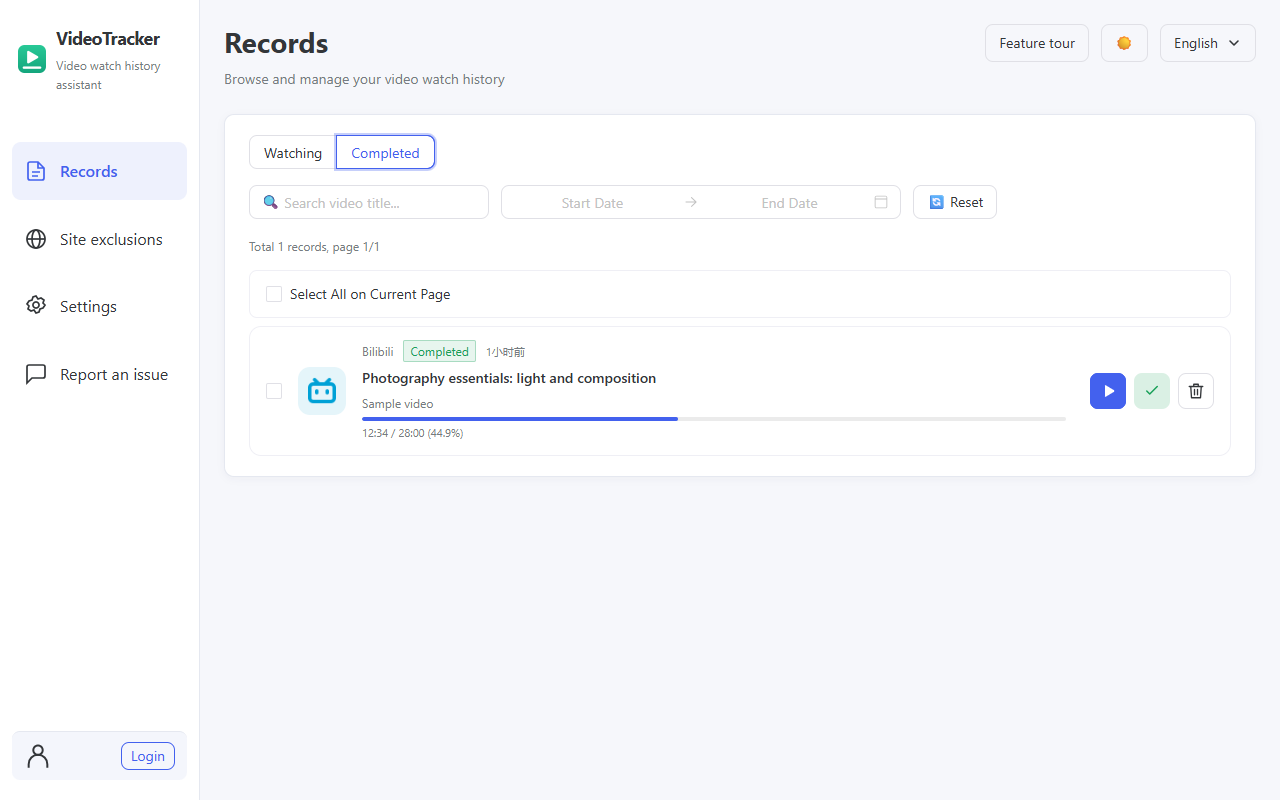
Completion is detected automatically. Mark status manually without losing position, or watch completed videos again from the beginning.

🧭

Four-Step Feature Tour

Get started with records, automatic recording, viewing thresholds and shortcuts. Skip, resume or restart whenever you need.

Keep watching. Keep finished videos organized.

Current source interface Β· Fictional records Β· Marking completion preserves your position

Completed records with completion status, preserved progress and watch-again action
Watch a completed video again, or mark it unfinished to continue.

Supported Platforms

Built-in adapters for mainstream video platforms with precise video info extraction

Bilibili
bilibili.com
YouTube
youtube.com
iQIYI
iqiyi.com
Tencent Video
v.qq.com
Automatic Detection
Other compatible HTML5 sites

Get Started

Save and resume videos without an account

1

Install the Extension

Download a published package and follow the installation guide. Local recording needs no sign-in.

2

Choose How to Save

Use the shortcut to save immediately, or enable automatic recording and choose a viewing threshold.

3

Resume Watching

Choose a video from the popup or records page to open its original page and resume in a supported player.

4

Sync or Send Feedback

Sign in and enable encrypted sync when you need another device. Use the extension's feedback page to report a problem.

πŸ”’

Privacy First

Local-first, encrypted sync only when you choose

βœ“ Records stay local by default; remote thumbnails require image requests
βœ“ Cloud sync is optional and must be enabled after sign-in
βœ“ Records are encrypted on-device; cloud services also process account and connection data
βœ“ Completely open source, code is auditable
βœ“ Confirmed feedback sends your text, image and entered email for developer support, separately from encrypted sync
βœ“ Uninstalling clears local data; contact the developer to request cloud or account deletion

Start Using VideoTracker

Free, open source, no ads. Make binge-watching easier.